Billing & POS
Billing that keeps up with your counter
A billing screen is judged on one thing: how many seconds it takes to move a customer through it. Cartix keeps the whole bill on one keyboard-driven screen — scan, weigh, search and settle in one flow, with nothing you need hidden behind a popup.
A quicker counter. A calmer day.
Scan a barcode, find a loose item, split a payment. Everything you need to finish the bill stays within reach.
Explore point of sale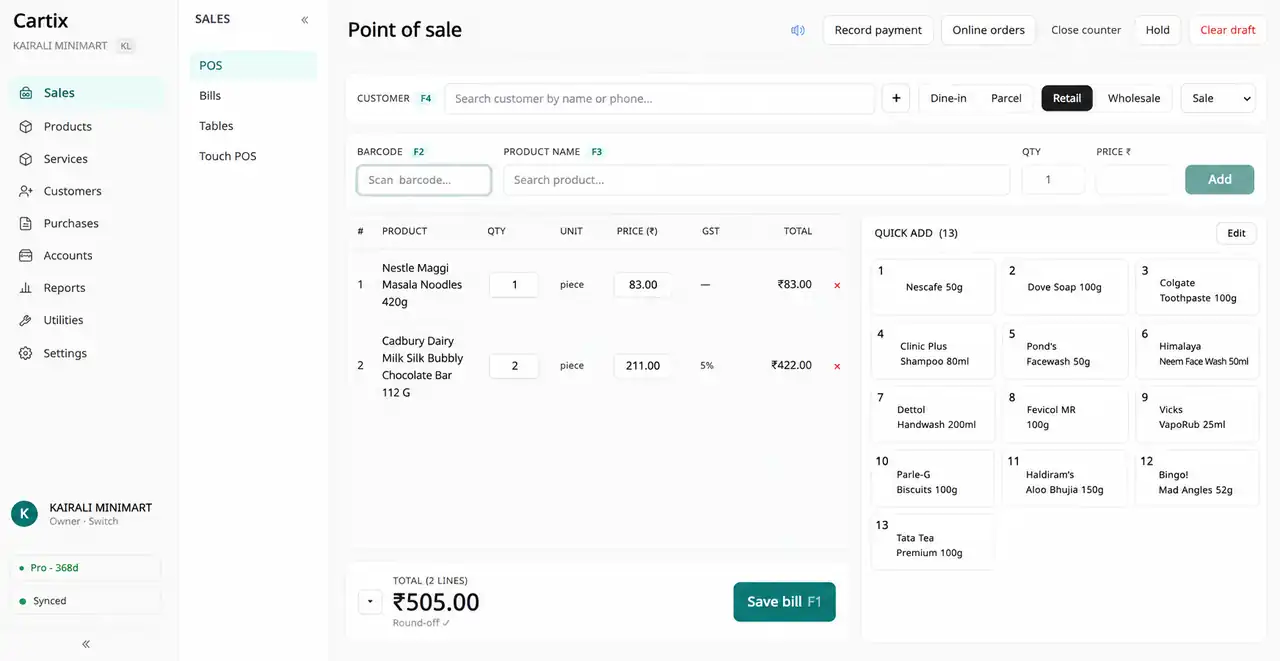
Billing line entry
- Barcode field on F2 — scan and the line is on the bill
- Product name search on F3 for loose and no-barcode items
- A scan that is not a barcode is checked against serial and IMEI numbers automatically
- Weigh-machine barcodes decoded on scan — weight and price land on the line by themselves
- Quantity, price and line discount editable directly on the line
- Retail and wholesale price modes, switchable on the bill header
- GST per line, tax-inclusive or exclusive pricing, automatic round-off
- Sale and return bills with the same flow
- Service items billed alongside products — charges that carry GST but no stock
Payments, done properly
- Cash, UPI, Card, Credit, EMI, Bank, Cheque and Other
- Split one bill across several payment methods
- One-tap “full credit” for udhaar customers
- Live credit projection — the customer’s balance after this bill, shown before you commit
- Loyalty points redeemed right in the payment dialog
Speed tools
- Hold a bill when the customer runs back for one more item — resume it in one tap, several at a time
- Pinned favourites grid for your fastest movers
- Last-rate memory — the price this customer got last time, shown at the line
- Salesman tagging on the bill, with a commission report behind it
- F-key shortcuts everywhere, so hands never leave the keyboard
Counter discipline
- Billing only runs inside an open counter session — every bill lands in exactly one Z-report
- Cash in and out recorded against the session
- Close with declared cash; variance computed and frozen — a Z-report never changes later
- Void needs a reason, a permission, and stays inside that staff member’s void limit
- Convert any bill into a tracked home delivery
Touch POS for tablets
- A tablet-friendly skin with photo product tiles and letter navigation
- On-screen tender pad for cash counting
- Same billing engine underneath — a tile tap takes the exact code path of a scan
Printing & hardware
- 58mm and 80mm thermal receipts with your logo — and a UPI QR that already contains the bill amount
- A4 and A5 tax invoice formats for wholesale and B2B bills
- Any USB or Bluetooth barcode scanner works
- Weigh-scale integration both ways: parse its barcodes, export its PLU file
Questions people ask
Can I bill without a barcode scanner?
Yes. Press F3 and type any part of the product name — Cartix matches English and Malayalam names. Pin your fastest movers to the favourites grid and they are one tap away, no barcode needed.
Does Cartix work with a weighing machine?
Yes, in both directions. It decodes the weight-embedded barcodes your scale prints (two common formats), so packed vegetables scan like any item — and it exports the PLU file your scale loads its product codes from.
A customer wants the bill on credit. What does the cashier see?
One tap marks the bill as udhaar. Before committing, the payment dialog shows the customer’s current balance and what it becomes after this bill — if that crosses their credit limit, the cashier knows before the goods leave the counter.
Can I print the customer’s UPI QR with the amount filled in?
It is already on the receipt. Every 80mm receipt carries a UPI QR with that bill’s exact amount embedded, so the customer scans and pays without typing anything.
Other modules
Bill. Manage. Grow.
Where one sale ends, the next one begins.
See how Cartix connects your counter, your business and your next customer visit. Book a free walkthrough with our team.
Free remote demo · English & Malayalam · Built for Indian businesses