Retail shops
A better shop day. A reason for customers to return.
Your retail counter has to handle much more than receipts: a regular’s credit balance, a supplier delivery, a return and the evening rush. Cartix brings those everyday jobs together, then connects the sale to offers and loyalty that encourage the next visit.
What actually goes wrong, and what Cartix does about it
- The sale and the stock book disagree
- Record purchases, sales, returns and adjustments against the same stock ledger. Use reorder levels and stock history to investigate shortages before buying more.
- A regular’s balance lives in a notebook
- Find the customer by name or phone, see the running balance and check the projected credit position before saving a new bill. Give staff only the permissions they need.
- The rush leaves no time for promotions
- Configure offers and loyalty in advance so eligible bills follow your rules at checkout. Use customer-specific coupons or scratch rewards to encourage another visit.
- The owner is away from the counter
- Use the connected owner view for remote reports while online with an active care plan. The desktop keeps core billing and local reports working during internet interruptions.
The modules that matter most here
- Billing & POSKeyboard-first billing with barcode and weigh-scale scanning, split payments, hold/resume and a tablet Touch mode.
- Stock managementA movement ledger that counts itself honestly — expiry and dead-stock reports, staff-phone stock audits, serial-aware branch transfers.
- Customers & creditUdhaar with live limits at billing, receivables aged in buckets, WhatsApp statements and loyalty balances.
- Offers & marketingNine offer types, coupons, Scratch & Win on customer phones, loyalty — and a forecast that replays your real bills before you launch.
The counter your staff will use
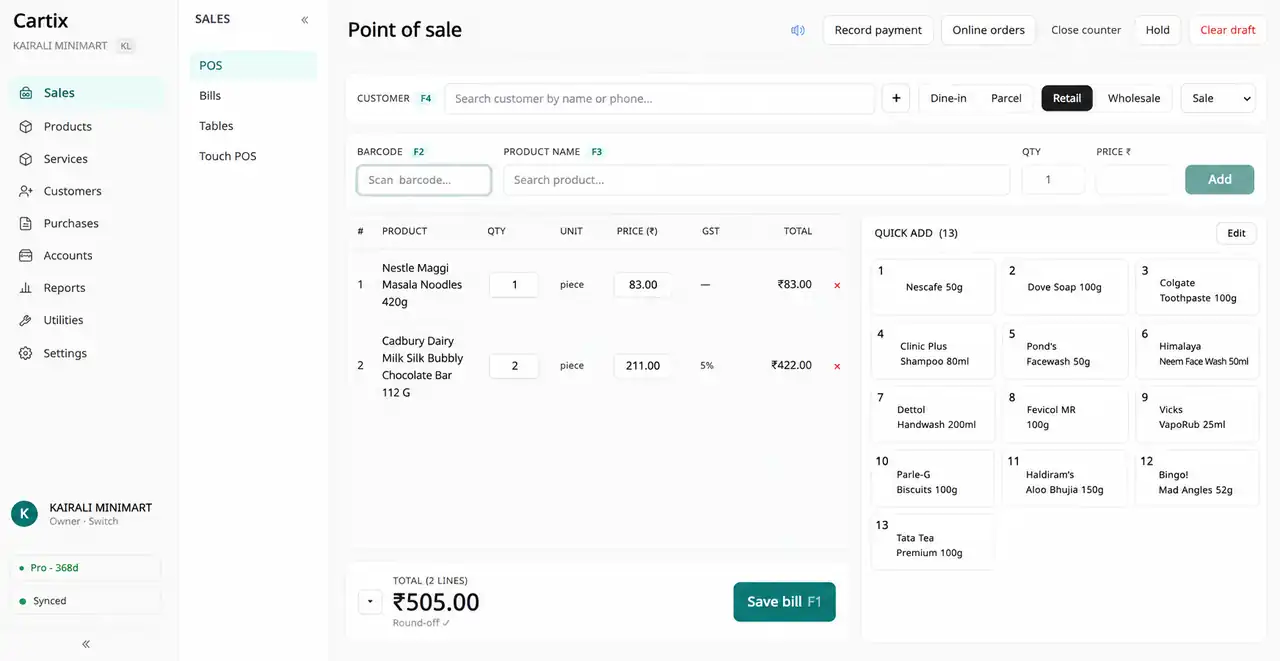
One screen, keyboard-first, the same in every trade. What changes between industries is the data behind it, not the muscle memory.
- F2Scan barcode
- F3Search product
- F4Pick customer
- F1Save bill
Questions people ask
Can I keep using my existing computer?
Cartix Desktop runs on Windows 10 or 11 with 4 GB RAM. Bring your printer and scanner models to the demo so the team can check your setup before you buy.
Can I bring over my product list?
Cartix supports product and customer CSV import. Review a sample export with the team first, including opening stock and customer balances. Keep the old system available for historical records.
What should I test in a retail demo?
Scan a packaged product, find a loose item, hold a bill, sell on credit, process a return and redeem loyalty points. Then switch off internet and repeat the core billing flow.
Other trades
Bill. Manage. Grow.
Where one sale ends, the next one begins.
See how Cartix connects your counter, your business and your next customer visit. Book a free walkthrough with our team.
Free remote demo · English & Malayalam · Built for Indian businesses